In this article
The Pulse solution can be configured with one of three different ways for users to select recipients from the contact database for the surveys:
Demographic filters where users define filters based on variables in the contact database, like the hierarchy, gender, age groups, tenure etc.
Contacts filter where users search for and select specific employees in the hierarchy.
Email address where users type or paste in emails of employees that should do the survey.
Demographic Filters
With demographic filters a user can select who the survey should be sent to by defining filters based on variables in the contact database. Filters can be based on any single question in the contact database, including the hierarchy question.
In addition it is possible to configure the solution to allow respondents to selecting a random sample, a percentage of the employees matching the filter.
It is also possible to give users the ability to exclude employees that were invited to specific surveys, which can be useful to avoid "survey fatigue", or in combination with random sampling if you send a survey out each quarter to 25% of the employees.
Filter Hierarchy
Filter hierarchy is used for filtering on a hierarchy variable in the contact database, and will present an interface where the user can navigate in the hierarchy and select one or more nodes. The user will also have the option to filter on the entire branch of the tree below the nodes selected, or just direct reports that are directly assigned to the selected nodes.
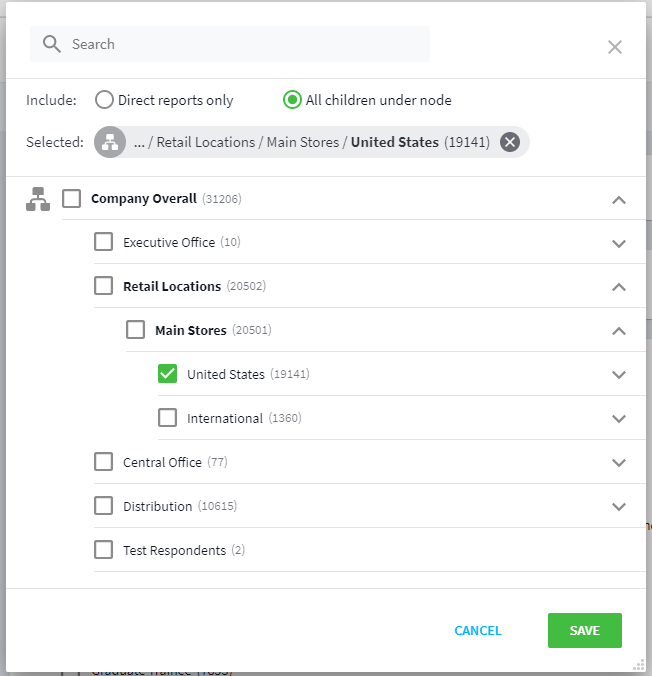
Figure 1 - Hierarchy Filter
| Name | Is required | Description |
|---|---|---|
question | Yes | The question id of the hierarchy question in the contact db. |
default | No | Can be set to ownerteam to set the current user’s own team as the default selected in the hierarchy. For this to have effect, the end user must have been created by synchronizing end users from contacts, and there must be a hierarchy node set for the user in the contact db (Creating a New End User List ). |
restrictByNodeAssignments | No | If set to true, the available part of the hierarchy for selection will be restricted by the end user’s node assignments in hierarchy management. |
Example
config sampling {
  filter hierarchy {
    question: hierarchy
    default: ownerteam
  }
}
Filter Multiselect
Filter multiselect is used for filtering on other single variables in the contact database, like for example gender. The user will be presented with checkboxes for the different categories in the single question.
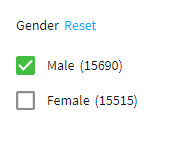
Figure 2 - Multiselect Filter
| Name | Is required | Description |
|---|---|---|
question | Yes | The question id of the single question in the contact db. |
Example
config sampling {
  filter multiselect {
    question: gender
  }
}
Filter Exclusion
An exclusion filter is used to allow users to exclude people who have been invited to one or more privious surveys from being selected for the current survey.
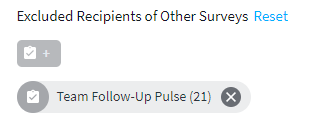
Figure 3 - Excluding Surveys
| Name | Is required | Description |
|---|---|---|
surveys | Yes | Specific surveys that should always be excluded, or none. |
Example
config sampling {
  filter exclusion {
    surveys: none
  }
}
Random Sample
By including a filter random block, users will be presented with an interface to set a percentage to sample from the subset of employees that matches the other filter settings. This could be useful in situations where you don’t necessarily need to survey all employees to get an understanding of the current state of their engagement.
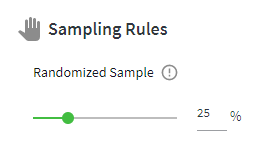
Figure 4 - Multiselect Filter
| Name | Is required | Description |
|---|---|---|
surveys | Yes | Specific surveys that should always be excluded, or none. |
Example
config sampling {
  filter random
}
Full Example of Demographic Filter
config sampling {
  filter hierarchy {
    question: hierarchy
  }
  filter exclusion {
    surveys: none
  }
  filter multiselect {
    question: Global_Role
  }
  filter multiselect {
    question: Gender
  }
  filter multiselect {
    question: Country
  }
  filter multiselect {
    question: Generation
  }
  filter random
}
Contacts Filter
With a contacts filter, users will select individual contacts. They will be presented with an interface that allows them to search for and select individual contacts in the hierarchy.
| Name | Is required | Description |
|---|---|---|
question | Yes | The hierarchy question in the contact database. |
default | No | If this setting is added and set to ownerteam, it will set the current user’s own team as the default selected. For this to have effect, the end user must have been created by synchronizing end users from contacts, and there must be a hierarchy node set for the user in the contact db (Creating a New End User List ). |
restrictByNodeAssignments | No | If set to true, the available part of the hierarchy for selection will be restricted by the end user’s node assignments in hierarchy management. |
Example
config sampling {
    filter contacts{
    question: hierarchy
    default: ownerteam
    }
}
Exclude owner
You may want to prevent the survey creator (owner) from participating in his/her own survey by setting an exclusion filter. This is optional. If set, the survey owner will not be selectable.
| Name | Is required | Description |
|---|---|---|
default | No | If this setting is added and set to owner, it will not be possible for the user to select him/herself as a survey recipient. |
Example
filter exclusion {
    contacts: owner
    }
Full Example of Contacts Filter
config sampling {
    filter contacts{
        question: hierarchy
        default: ownerteam
    }
    filter exclusion {
        contacts: owner
    }
}
Email Address
The Pulse solution can be configured to allow users to paste in email addresses instead of selecting them from a contact database. This can be useful in the event it is not possible or practical to upload employee details with data to a contact database. If using this option, you loose the ability to have background data with you contacts, but you have the flexibility to easily add anyone to a survey just by providing their email address. The solution still require a contact database to keep track of survey activity. The email address will be used as the contactid in the contact database. Emails can either by typed or pasted in.
Example
config sampling {
filter emaillist { }
		}
Sampling Templates
Multiple sampling configurations may be specified within a single Pulse program and then assigned to specific templates.
Defining Sampling Templates
For each additional variation of a sampling configuration, a sampling template can be specified.
Note: A default sampling configuration must exist in the Pulse program.
config sampling {
  //this is the default sampling config
   filter hierarchy {
      question: hierarchy
   }

// additional sampling templates can be added
samplingTemplate #st1{
  filter emaillist {
   }
}

} //config sampling close
Applying Sampling Templates to a Survey Template
Once one or more sampling templates have been created, these may be optionally assigned to a predefined survey template. If no sampling template is assigned, then the survey template will use the default sampling configuration.
template pulse #employee {
//sampling template using default sampling
label: "Basic template"
notes: "Start from scratch and add e.g. custom questions"
questions: VOE2,VOE5,VOE10,VOE11,VOE12,VOE17
availableQuestions: VOE1,VOE3,VOE8,VOE9
languages: en
emailInvite: Invitation2
emailReminder: Reminder2
}
template pulse #employeest {
// survey template with a sampling template reference
label: "Basic template with emailing"
notes: "Template using emailing sampling"
questions: VOE2,VOE5,VOE10,VOE11,VOE12,VOE17
availableQuestions: VOE1,VOE3,VOE8,VOE9
languages: en
emailInvite: Invitation2
emailReminder: Reminder2
samplingTemplate: st1 //use sampling template st1
}